
Last Updated: June, 2026
This is part of the complete ePoS Assam guide — the main hub for all AEPDS tools and reports.
Quick Answer:
The AEPDS Assam beneficiary list shows every ration card assigned to a specific Fair Price Shop. To check it, go to epos.assam.gov.in → Beneficiary Details → select your district, block, and FPS code → the full list of cards assigned to that shop appears. If your card is on this list, your FPS dealer is authorised to give you ration. If your name is missing from the list, your card has been assigned to a different FPS or there is a registration error — visit your Circle Office to correct it.
As of now, there is no direct search option to check your name in the AEPDS Assam beneficiary list. You must check it FPS-wise using district, block, and FPS code filters.
For a complete overview of all ration-related tools and reports available on the portal, see our main guide on ePoS Assam system and reports.
You went to collect ration this month and the dealer said your card is not in his system. The ePoS machine showed your Aadhaar but would not process the transaction. He told you to go to the Circle Office. You went to the Circle Office and they said everything looks fine on their end. Nobody could tell you in five minutes what the actual problem is.
Here is what probably happened: your ration card is registered in the RCMS system correctly, but it is not assigned to this particular FPS shop in the AEPDS system. These are two different databases that should be in sync but sometimes are not — especially after FPS shop changes, ration card transfers between districts, or data migration errors during system upgrades.
The AEPDS beneficiary list is the document that tells you exactly which cards are authorised at your FPS shop. Checking it takes three minutes and immediately tells you whether your card is correctly assigned. This guide shows you how to check it, how to read it, and what specific steps to take if something is wrong.
What Is the AEPDS Beneficiary List?
Every Fair Price Shop in Assam has a specific list of ration cards authorised to collect ration from it. This is called the FPS beneficiary list or the AEPDS beneficiary list. It is maintained in the AEPDS — Aadhaar Enabled Public Distribution System — which powers all ePoS machines in Assam.
The list is the ePoS machine’s reference. When you go to collect ration and authenticate with your fingerprint, the machine checks whether your card number is in the beneficiary list for that FPS. If it is, the transaction proceeds. If it is not — even if your ration card exists and is active — the machine will reject the transaction because it does not recognise your card as belonging to that shop.
| The AEPDS beneficiary list and the RCMS ration card database are two different systems (see our full guide on RCMS Assam ration card system). RCMS shows whether your ration card exists and is active. AEPDS shows whether your card is assigned to a specific FPS shop. A card can be active in RCMS but missing from the AEPDS list for your FPS — and this is when the ePoS machine rejects you even though your card is valid. |
How to Check the AEPDS Beneficiary List — Step by Step
- Open epos.assam.gov.in on your phone. The portal is mobile-friendly and does not require any login.
- Look for Beneficiary Details or FPS Beneficiary in the menu. On the main page there is usually a Reports section or a direct link for beneficiary details.
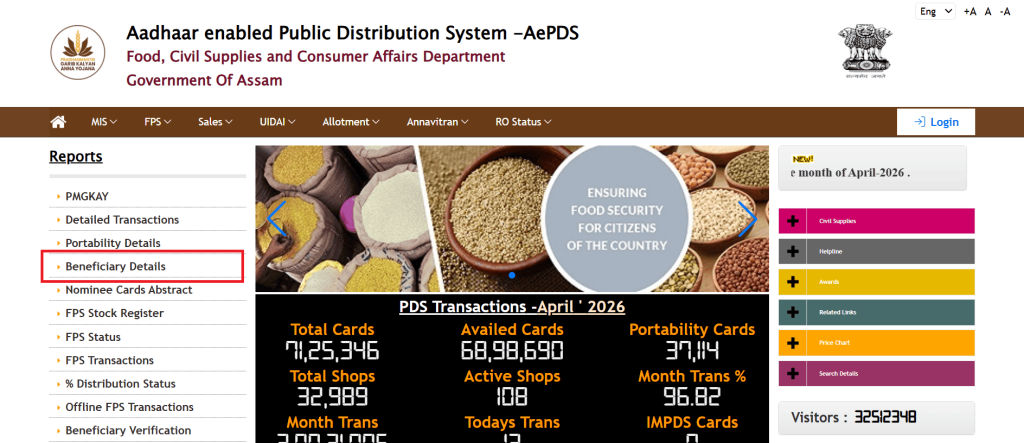
- A filter page appears. Select the month and year along with your ration card no.
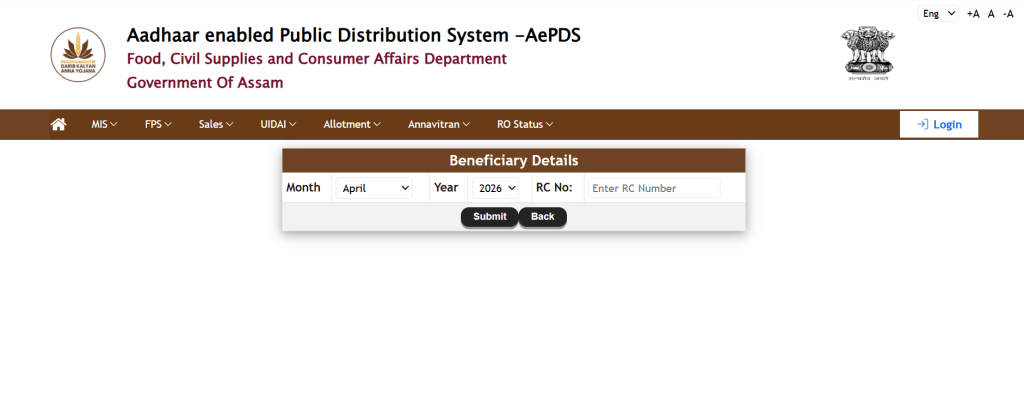
- By submitting, the beneficiary list that belows to that ration card will appear with the FPS no.
| The portal is heavily used on weekdays between 10 AM and 5 PM. If it loads slowly, try before 9 AM or after 9 PM. If the beneficiary list for your FPS is very long — some larger FPS shops have 200 to 400 cards — use the browser search to find your name quickly rather than scrolling through the entire list. |
How to Find Your FPS Code
You need your FPS code to verify it. There are three ways to find it:
- Check your ration card — the FPS code or FPS name is sometimes printed on the card itself or on the acknowledgement slip you received when the card was issued
- Go to epos.assam.gov.in → RC Details → enter your ration card number → your assigned FPS name and code appear in your card record (see our step-by-step guide on how to check RC Details in Assam).
- Ask your FPS dealer directly — the FPS code is displayed on the ePoS machine and the dealer knows it
| Each FPS has a unique code in the AEPDS system — typically a 6 to 10 digit number. Once you have it, you can check the beneficiary list, distribution status, date-wise transactions, and sales register for your specific shop anytime. Write it down somewhere accessible. |
What the Beneficiary List Shows — Column by Column
| Column | What It Shows | What to Check |
| RC Number | The ration card number registered in the AEPDS system | Should match the number on your physical ration card exactly |
| Household Head Name | Name of the primary cardholder | Check spelling — even a small mismatch can cause ePoS authentication issues |
| Card Category | AAY or PHH — the type of ration card | AAY gets higher grain entitlement. Confirm your category is correct. |
| Number of Members | Total family members on the card | If this is less than your actual family size, visit Circle Office — you are receiving less grain than entitled |
| Mobile Number | Phone number registered for OTP-based authentication | Must be an active number the household head can access — needed for OTP fallback if fingerprint fails |
| Aadhaar Seeded | Whether Aadhaar is linked for at least one member | If Not Seeded appears, visit bank or CSC to seed Aadhaar — otherwise fingerprint authentication will not work |
| Status | Active or Inactive | Inactive means your card has been flagged or suspended in the AEPDS system — visit Circle Office immediately |
Why Your Name Might Be Missing From the Beneficiary List
Reason 1 — Your card is assigned to a different FPS
This is the most common reason. When ration cards are issued or transferred, the assignment to a specific FPS is done administratively. If you moved within the same district, if FPS boundaries were redrawn in your area, or if a data error occurred during a system migration, your card may still be assigned to the old FPS in the AEPDS system even though you go to the new one.
To confirm this: check your card on the epos.assam.gov.in RC Details page. Your assigned FPS code is shown there. If that code does not match the FPS you go to, you need to request a transfer.
Fix: Visit the Circle Office with your Aadhaar card and ration card. Request an FPS transfer in the AEPDS system to your correct shop. This is a standard administrative correction that typically takes 7 to 15 working days.
Reason 2 — New ration card not yet added to AEPDS
If you received a new ration card recently — especially one issued in the last 30 to 60 days — it may be active in the RCMS system but not yet migrated into the AEPDS FPS beneficiary list. The two systems do not sync in real time. New cards are added to AEPDS lists in batches, usually at the beginning of each month.
Fix: Visit your Circle Office and ask specifically whether your card has been added to the AEPDS beneficiary list for your FPS. If not, request the Circle Office to update the AEPDS record. This should happen within 15 days.
Reason 3 — Card was suspended in AEPDS during a re-survey
Periodic government re-surveys sometimes result in cards being suspended or removed from the AEPDS active beneficiary list — for ineligibility findings, duplicate card detection, or data mismatches. If your card shows Inactive status in the beneficiary list, this is what happened.
Fix: Visit the Circle Office immediately with your Aadhaar card, ration card, and BPL documentation. Ask specifically why the card was made inactive in AEPDS and what documents are needed to restore it. Do not wait — every month the card stays inactive is a month of ration you cannot collect.
Reason 4 — Aadhaar not seeded in AEPDS
Even if your Aadhaar is seeded in RCMS, it may not have been properly reflected in the AEPDS record for your FPS. The ePoS machine uses the AEPDS Aadhaar record for fingerprint matching. If the Aadhaar number in AEPDS is blank or wrong, fingerprint authentication fails every time.
Fix: Visit the Circle Office or Common Service Centre with your Aadhaar card and request Aadhaar seeding in the AEPDS record. This is different from RCMS seeding — you may need to do both separately.
Reason 5 — FPS was changed and list not updated
In Assam, FPS shops are sometimes reassigned, closed, or merged. When this happens, the beneficiary lists need to be migrated from the old FPS to the new one in AEPDS. If this migration was incomplete or delayed, some cards from the old list may not have been moved to the new FPS record.
Fix: Visit the Circle Office and ask about the FPS change in your area. Confirm which FPS you are officially assigned to now and request your card be correctly reflected in that FPS’s AEPDS beneficiary list.
What to Do If Your Name Is Missing — Step by Step
- Check the epos.assam.gov.in RC Details page first. Enter your ration card number and see which FPS you are assigned to in the system.
- Go to the beneficiary list for the FPS shown in your RC details. Check if your name appears there. If yes, your dealer is wrong — your card is on the list. Show him the screenshot.
- If your name does not appear on any nearby FPS list, take a screenshot of the RC details showing your card is active and note the FPS it shows.
- Visit your Circle Office with your Aadhaar card, ration card, and the screenshots. Tell them your card is active in RCMS but not appearing in the AEPDS beneficiary list for your FPS.
- Ask for a written acknowledgement of your complaint. Note the date and the staff member’s name.
- Follow up after 15 working days. The correction should be done by then. If not, escalate to the DFSO — District Food Supply Office.
| Take screenshots at every step. The RC Details page showing your card is active, the beneficiary list showing your name is missing, and the Circle Office acknowledgement. These three screenshots together are the complete evidence package if you need to escalate. WhatsApp them to yourself so you do not lose them. |
FPS Beneficiary List vs Other AEPDS Reports — What Each One Is For
| Report | What It Answers | Where to Find It |
| FPS Beneficiary List | Is my card assigned to this FPS shop? Is my Aadhaar seeded? How many members are on my card? | epos.assam.gov.in → Beneficiary Details |
| Distribution Status | Did this FPS shop distribute ration this month at all? | epos.assam.gov.in → Distribution Status |
| Date Wise Transaction | On what exact date was my card used and how many kg were recorded? | epos.assam.gov.in → Reports → Date Wise Transaction |
| Sales Register | How much stock did this FPS receive and how much was distributed? | epos.assam.gov.in → Reports → Sales Register |
| RC Details | What is my card category, which FPS am I assigned to, is my Aadhaar seeded? | epos.assam.gov.in → RC Details |
After confirming your card is on the beneficiary list, the next step is to check whether ration was actually distributed this month using the ePoS Assam distribution status report.
To verify the exact date your ration was issued and how many kilograms were recorded against your card, check the ePoS Assam date-wise transaction report.
Use the beneficiary list first to confirm your card is correctly assigned to your FPS. Only then does checking the distribution status or date-wise transaction make sense — because if your card is not on the list, none of those other reports will show your card’s activity at that shop.
When Your Card Is on the List But ePoS Still Rejects You
This is a different problem from missing from the list. Your card appears in the AEPDS beneficiary list — you can see your name — but when you go to the shop and press your thumb on the machine, it rejects the transaction. Here is why this happens:
- Fingerprint not matching — elderly people and those who work with hands often have worn fingerprints. Ask the dealer to try OTP authentication instead — an OTP is sent to the registered mobile number and used instead of fingerprint.
- Registered mobile number is wrong or inactive — if OTP fails too, the mobile number registered in AEPDS may be wrong. Visit Circle Office to update the mobile number.
- Card already used this month — the ePoS machine will not process a second transaction if ration was already given against your card this month. Check the date-wise transaction report to see if a transaction was recorded without your knowledge.
- Server down — AEPDS has occasional downtime, especially at the beginning of the month when distribution volume is high. If authentication fails on one day, try again the next working day before assuming something is wrong with your card.
| If fingerprint consistently fails across multiple visits, request iris authentication if your FPS has an iris scanner, or OTP authentication. Do not let a dealer tell you that you cannot collect ration because the machine is not working — the system has multiple authentication fallbacks precisely for situations when fingerprint does not work. Push for OTP authentication before accepting rejection. |
Orunodoi and the FPS Beneficiary List — the Connection
This is something many people do not know: whether your name appears in the AEPDS FPS beneficiary list also affects your Orunodoi eligibility check. Orunodoi 3.0 is linked to AAY ration cards (see how to check eligibility in the Orunodoi new list 2026 guide). If your AAY card appears in the AEPDS beneficiary list as Active, it confirms your Orunodoi status from the distribution side.
If your card shows as Inactive in the AEPDS list, it may be one of the reasons your Orunodoi payment is not coming — the payment system cross-references the AEPDS active status. Restoring your card in the AEPDS beneficiary list is a step that sometimes also resolves a stopped Orunodoi payment.
Frequently Asked Questions
How to check AEPDS Assam beneficiary list?
Go to epos.assam.gov.in, look for Beneficiary Details in the menu, select your district, block, and FPS code, then click View. The full list of ration cards assigned to that FPS appears. No login is needed. Search for your name or ration card number in the list. If you appear, your card is correctly assigned to that shop.
My name is not in the AEPDS beneficiary list — what to do?
First check your RC Details on epos.assam.gov.in to confirm which FPS your card is officially assigned to in the system. If the assigned FPS is different from where you go to collect ration, visit your Circle Office to request an FPS transfer. If your card is assigned to the right FPS but not appearing in the list, visit the Circle Office with your Aadhaar card and ration card and ask for your card to be added to the AEPDS list for your FPS.
What is the difference between the AEPDS beneficiary list and the RCMS list?
RCMS shows whether your ration card exists and is registered in the government system — it is the registration database. AEPDS shows whether your card is assigned to a specific FPS shop and is active for monthly ration collection — it is the distribution database. A card can be active in RCMS but missing from the AEPDS FPS list, which is why the ePoS machine can reject a valid ration card.
The ePoS machine is rejecting my fingerprint but I am on the beneficiary list — what to do?
Ask the dealer for OTP authentication — an OTP will be sent to the mobile number registered on your card. If OTP also fails, the registered mobile number may be wrong — visit the Circle Office to update it. If authentication consistently fails across multiple attempts on different days, visit the Circle Office with a written complaint about biometric failure.
How do I find my FPS code to check the beneficiary list?
Go to epos.assam.gov.in → RC Details → enter your ration card number. Your assigned FPS name and code appear in your card details. Alternatively, ask your FPS dealer — the code is displayed on the ePoS machine and on the shop’s signboard in most areas.
My card shows Inactive in the AEPDS beneficiary list — what does this mean?
Inactive means your card has been suspended or deactivated in the AEPDS distribution system. You cannot collect ration until it is restored. Visit your Circle Office immediately with your Aadhaar card and ration card. Ask the specific reason for the Inactive status and what documents are needed to restore it.
How many members should appear on the AEPDS beneficiary list for my card?
The number of members shown should match the number of members registered on your ration card. Under NFSA, PHH households receive 5 kg of grain per member per month. If the AEPDS list shows fewer members than you actually have on your card, you are receiving less grain than entitled. Visit the Circle Office with your ration card to request correction of the member count.
Final Note
The AEPDS beneficiary list is the starting point for understanding almost every ration-related problem. Before checking whether ration was distributed this month, before looking at date-wise transactions, before filing a complaint against your dealer — check this list first and confirm your card is correctly assigned and showing as Active at your FPS.
Most ration problems that families in Assam think are dealer problems are actually data problems — card assigned to the wrong FPS, Aadhaar not seeded in AEPDS, member count wrong. These are fixable in one Circle Office visit with the right documents. The list is public, free to access, and available any time on your phone.
Once your card is confirmed as Active in the FPS list, you should immediately check whether ration was distributed and whether your card was used using the distribution status and date-wise transaction reports linked above.

Hi, I’m Palash, the person behind AssamInfoHub — an independent platform helping Assam citizens understand government schemes, pensions, and welfare programs in simple language. Information published here is compiled from official government notifications, district-level practices, and Panchayat-level verification methods. My goal is to reduce misinformation and help families follow the correct procedures without depending on agents.