
Last Updated: April 2026
Quick Answer
Quick Answer: To check ePoS Assam distribution status, visit epos.assam.gov.in and click on Transaction Details in the menu. Select the year and month, then enter your FPS ID — find your FPS ID at epos.assam.gov.in/dfso_fps_details by selecting your district. The report shows all ration distributed at your shop that month. Search by your RC number to check your individual record.
Every month, people across Assam go to their Fair Price Shop to collect ration under NFSA. But a very common problem happens across rural Assam — you go to the shop, the dealer says there is some issue with your Aadhaar or the machine is not working, and you leave without getting your full entitlement.
Or the opposite — the dealer says ration did not come this month, but you are not sure whether that is true or whether distribution happened and you were missed.
You can check this yourself online — So you don’t have to just trust what the dealer tells you. The government system records every single transaction when ration is distributed through the ePoS machine. Here’s how to check it, what the report means, and what you should do if something looks wrong.
Steps in this guide have been verified on the live epos.assam.gov.in portal in April 2026.
What Is ePoS Assam Distribution Status?
ePoS stands for electronic Point of Sale. Every Fair Price Shop in Assam that operates under the National Food Security Act is equipped with an ePoS machine. This machine is connected to the central government system and records every transaction when a beneficiary collects ration.
When your ration is successfully distributed, the ePoS machine records your Aadhaar number, the date, the quantity distributed, and the FPS shop ID. This data gets uploaded to the government server almost immediately.
However, users may not always see complete real-time transaction details online. The portal mainly helps verify whether distribution was recorded at the FPS level and your last transaction status.
To understand how the entire ration distribution system works in Assam, you can check the full PDS system details here.
So for any month, this report shows whether ration was actually distributed at your FPS shop and how many people received it. You can check this at the district, block, FPS, or individual ration card level.
Key difference: FPS Status tells you whether your Fair Price Shop machine is active and operational. Distribution Status tells you whether ration was actually distributed to beneficiaries through that machine this month. Both are useful—but they tell you different things.
If you want to check whether your FPS machine is active or facing technical issues, you can check the ePoS FPS status on the ePoS portal.
Where to Check ePoS Assam Distribution Status
| Portal | URL | What You Can Check | Best For |
| AePDS Assam | epos.assam.gov.in | FPS status, transactions, RC details, distribution reports | Most comprehensive — use this first |
| IMPDS National Portal | impds.nic.in | Monthly distribution dashboard, state-wise reports | Cross-checking national data |
| NFSA Portal | nfsa.gov.in | RC details, beneficiary information, state reports | Checking your ration card entitlement |
Make sure you only use official .gov.in websites. Many unofficial websites claim to show distribution status but are not connected to real government data. Never enter your Aadhaar number on non-government websites.
How to Check ePoS Assam Distribution Status — Step by Step
Method 1 — Check Distribution Status at epos.assam.gov.in
Before checking distribution, you need your FPS ID. Most beneficiaries do not know this number. Here is how to get it first:
Go to epos.assam.gov.in/dfso_fps_details — this page shows FPS details for every district in Assam. Select your district and find your village Fair Price Shop. Note down the FPS ID shown against your shop name. This is a unique number assigned to your FPS dealer by the government.
Once you have your FPS ID, follow these steps:
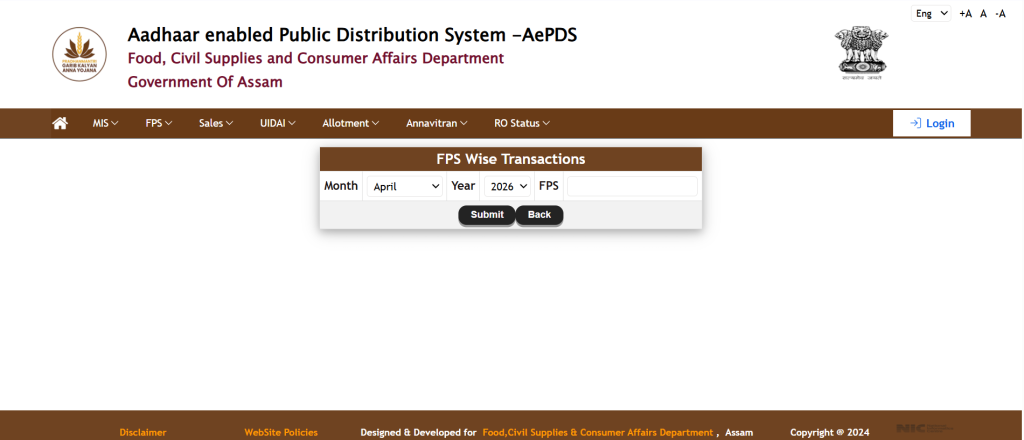
- Go to epos.assam.gov.in
- Click on Transaction Details in the top menu
- Select the Year from the dropdown
- Select the Month you want to check
- Enter your FPS ID in the field provided
If you do not have internet access or cannot find your FPS ID online, visit your Gaon Panchayat Secretary and ask for the FPS ID of your village ration shop. Every Panchayat Secretary has this number.”
- Click Submit
- The report loads showing all transactions recorded at your FPS shop for that month
Once the report loads, you can verify your specific ration card within it:
- Look for an option to search or filter by RC number
- Enter your RC number — the ration card number printed on your card
- Your individual transaction record appears showing whether distribution was recorded against your card for that month, the date, and the quantity
Method 2 — Check Your Individual RC Distribution Status
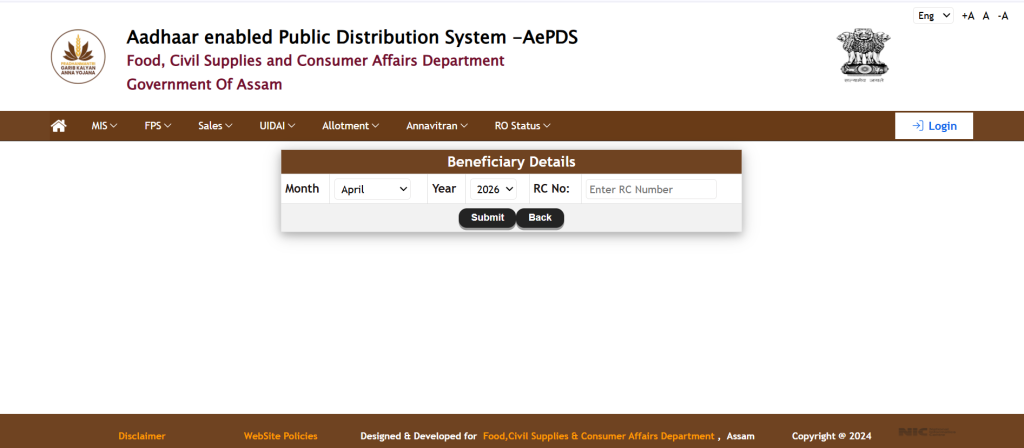
- Go to epos.assam.gov.in
- Go to beneficiary details from the left menu
- Enter your RC number — the ration card number printed on your card along with the month and year as shown in the below screenshot.
- Click Submit
- The page shows your ration card details including the last transaction date
- If the last transaction date shows the current month, your ration was distributed. If it shows a previous month, distribution was not recorded for you this month
If the last transaction date shows a previous month but you went to collect ration this month, it could mean your Aadhaar authentication failed, the dealer distributed without scanning your card, or the machine was offline and transactions were not uploaded. Contact your FPS dealer or Circle Office to clarify.
If you want to check whether your ration card is active, approved, or suspended, you can check your Assam ration card status here.
Note on Other Portals
Some websites mention checking distribution status through impds.nic.in or other national portals. These require official government login credentials and are not accessible to general public beneficiaries. For Assam beneficiaries, the correct and only public method is through epos.assam.gov.in as described in Methods 1 and 2 above.
What the Distribution Status Report Shows
| Column or Field | What It Means | What to Check |
| Total Beneficiaries | Number of ration cards registered at this FPS shop | Compare with how many families use your shop |
| Distributed Count | Number of cards that received ration this month | If much lower than total, some families were missed |
| Distribution Percentage | Percentage of beneficiaries who received ration | Below 70% may indicate problems at this shop |
| Last Transaction Date | Date when the last ration was distributed | Should show current month for active distribution |
| Transaction Amount | Quantity of ration distributed | Should match your entitlement under AAY or PHH |
Normal distribution percentage: Most functioning FPS shops in Assam distribute to 85-95% of registered beneficiaries each month. Below 60% is a warning sign — many families in your village may have been missed or ration was distributed irregularly.
How Much Ration Should You Get — AAY and PHH Entitlement
| Card Category | Monthly Rice Entitlement | Who Gets This |
| AAY (Antyodaya Anna Yojana) | 35 kg per household per month | Poorest of poor families — lowest income households |
| PHH (Priority Household) | 5 kg per person per month | BPL families under NFSA — a family of 4 gets 20 kg |
| Non-NFSA State Card | Varies by state scheme | Families under Assam state scheme, not central NFSA |
A PHH family of 4 should receive 20 kg rice per month. An AAY household should receive 35 kg. If the distribution status shows less than this, raise a complaint at your Circle Office with your RC number and entitlement details.
If you are not sure which type of ration card you have or what your full entitlement is, read our complete Assam ration card guide.
Many Assam government schemes like Orunodoi require an active NFSA ration card, so keeping your distribution records correct is important.
Real Situations Where Checking Distribution Status Helps
Situation 1 — Dealer says machine was not working
This is the most common complaint from rural Assam. The ePoS machine shows an error, the dealer distributes ration manually. But manual distribution without ePoS authentication is irregular and may not get recorded in the system.
If this happened at your shop, check the distribution status. If zero transactions show for your FPS even though ration was physically given, the dealer is distributing without proper recording. Report this to the Circle Office. Your entitlement was given but not recorded — which may affect your future entitlement.
What to do: Report to your DFSO (District Food Supply Office) with your RC number, FPS name, and the month when no transaction was recorded despite receiving ration. Ask them to update the record. This protects your future entitlement.
Situation 2 — Dealer says ration did not come to your shop
You can verify this independently. Check the IMPDS portal for your district for the current month. If your district shows high distribution percentages but your FPS shows zero, the ration arrived at district level but your specific shop has an issue.
Compare your FPS distribution percentage with neighbouring FPS shops in the same block. If others show 85-90% and yours shows 0%, the problem is at your FPS dealer level, not the government allocation.This is something you should definitely report.
Situation 3 — Your Aadhaar authentication fails every month
Some beneficiaries face a persistent problem where the ePoS machine cannot verify their Aadhaar due to fingerprint issues — usually because of rough hands from agricultural or daily wage work.
If this keeps happening, you have the right to use OTP-based Aadhaar verification on your registered mobile number. Ask your FPS dealer to use OTP method instead of fingerprint. This is officially allowed under NFSA rules.
If your fingerprint does not work and you do not have a mobile number registered on Aadhaar, visit your nearest CSC centre and register a mobile number on Aadhaar. Once registered, OTP authentication becomes available at the FPS machine.
What to Do If Distribution Status Shows a Problem
- First, check the portal yourself and confirm what it shows. Note down what the portal shows.
- Talk to your FPS dealer first. The upload may be delayed by 1-2 days after distribution. Give it 3-4 days before escalating.
- If the problem persists — visit your Circle Office. Carry your ration card, Aadhaar card, and a note of the issue.
- At the Circle Office, explain: your RC number, the FPS shop name, the month, and what the portal shows versus what actually happened.
- You can also call the PDS helpline 1967 (toll free) — the national PDS grievance number that covers all states including Assam.
- For Assam-specific complaints, contact the District Food Supply Office (DFSO) of your district. Contact numbers are available on pds.assam.gov.in.
Do not pay any money to agents to fix distribution records. The process is completely free through official channels. Anyone asking for money to update your distribution record is operating illegally.
Common ePoS Distribution Status Issues and What They Mean
| Status or Error | What It Actually Means | What to Do |
| No data found for this RC | Your ration card has no transaction recorded this month | Check if RC is active; visit Circle Office if ration was distributed |
| Authentication failed | Your Aadhaar biometric did not match at the machine | Ask dealer to use OTP method; update biometric at CSC if needed |
| Transaction pending | Distribution was done but not yet uploaded to server | Wait 2-3 days; server sync may be delayed |
| FPS closed or inactive | Your FPS shop did not operate this month | Contact Circle Office; ration may be redirected to another shop |
| Quantity mismatch | Amount distributed does not match your entitlement | Raise complaint at Circle Office with your entitlement details |
ePoS Distribution Status vs FPS Status — Clear Comparison
| FPS Status | Distribution Status | |
| What it shows | Whether your Fair Price Shop machine is active | Whether ration was actually distributed this month |
| Portal section | FPS Status section on epos.assam.gov.in | Transactions or Distribution section on epos.assam.gov.in |
| What problem it identifies | Machine offline, shop not operational | Ration not distributed, quantity wrong, beneficiary missed |
| When to check it | When machine gives error at shop | When you want to confirm monthly ration was recorded |
Frequently Asked Questions
How do I check my ePoS distribution status in Assam?
Visit epos.assam.gov.in and click on Transactions or Distribution Status. Select your district, block, and FPS shop name. Select the current month. The report shows whether ration was distributed at your shop. For individual card status, use the RC Details option and enter your RC number.
What is ePoS Assam distribution status?
ePoS distribution status is a government record showing whether your Fair Price Shop distributed ration to beneficiaries in a given month. Every distribution through the ePoS machine is recorded automatically. You can check this report online to verify whether your monthly ration entitlement was correctly distributed.
Why is my ePoS distribution status showing zero this month?
Zero distribution can mean the FPS machine was offline during distribution, the dealer distributed without using the ePoS machine, your ration allocation did not arrive at your district, or there was a technical upload issue. Wait 2-3 days and check again. If still zero, visit your Circle Office with your ration card and Aadhaar.
What is the difference between epos.assam.gov.in and rcms.assam.gov.in?
epos.assam.gov.in is the ePoS portal showing FPS machine status, distribution transactions, and distribution reports. rcms.assam.gov.in is the Ration Card Management System showing your ration card details and beneficiary information. Use rcms to check your ration card details, use epos to check if ration was distributed.
How much rice should I get per month under NFSA in Assam?
AAY card holders get 35 kg per household per month. PHH card holders get 5 kg per person per month. So a family of 4 with a PHH card should receive 20 kg per month. Check your distribution status to confirm whether this quantity was recorded against your card.
Final Note
The ePoS distribution status system is one of the most useful but least known tools available to ration card holders in Assam. Most beneficiaries do not know they can independently verify whether their ration was properly recorded — they simply take the FPS dealer word for it.
It takes less than 5 minutes to check—and it can save you from missing your ration. If distribution was not recorded correctly, you have official channels to raise the complaint and get it corrected.





Hi, I’m Palash, the person behind AssamInfoHub — an independent platform helping Assam citizens understand government schemes, pensions, and welfare programs in simple language. Information published here is compiled from official government notifications, district-level practices, and Panchayat-level verification methods. My goal is to reduce misinformation and help families follow the correct procedures without depending on agents.